

How to Quickly Get Started with USDT TRC20 Wallet: Beginner’s Guide
What Are USDT TRC20 and Wallets?
USDT (Tether) is a stablecoin pegged to the US dollar, widely used for settlements and hedging in the crypto market. “TRC20” indicates that it operates on the Tron blockchain using its specific token standard. In simple terms, a USDT TRC20 Wallet is a digital wallet compatible with the Tron network that enables you to store, send, and receive USDT.
Compared to the traditional ERC20 version, USDT TRC20 offers exceptionally low transaction fees and rapid transfer speeds, making it suitable for frequent transactions.
Why Choose a TRC20 Network Wallet?
Choosing a TRC20 network wallet provides several key advantages:
- Low transaction fees: Sending USDT on the Tron network typically costs only a few cents.
- Fast transaction speed: TRC20 transfers are usually confirmed within seconds, making them suitable for frequent transactions.
- Broad compatibility. Leading exchanges, such as Gate, Binance, and OKX, fully support TRC20.
- Mature ecosystem: Tron boasts an active ecosystem for DApps, DeFi, and cross-chain applications, as well as extensive wallet support.
For personal payments, asset management, or merchant settlements, TRC20 wallets are an excellent choice for newcomers.
USDT TRC20 Wallet Types and Features Recommended for Beginners
When selecting a wallet, beginners should prioritize three key aspects:
- TRC20 network support: Popular multi-chain wallets like Gate Wallet, Trust Wallet, and TokenPocket all support TRC20. Tron-focused wallets such as TronLink offer more reliable DApp connectivity.
- Simplified interface and intuitive operation: Wallets suited for beginners should feature interfaces similar to mobile payment apps, making them easy to navigate.
- Robust security features: Look for mnemonic backup, local storage of private keys, and biometric authentication, including fingerprint and facial recognition.
How to Create and Use a USDT TRC20 Wallet (Step-by-Step)
Gate Wallet is used as an example below:
Step 1: Download the wallet application from the official website or app store. Do not use unfamiliar links. https://chromewebstore.google.com/detail/gate-wallet/cpmkedoipcpimgecpmgpldfpohjplkpp
Step 2: Create a wallet. Open the app → select “Create New Wallet” → write down the mnemonic phrase (12 or 24 words), and store it offline.
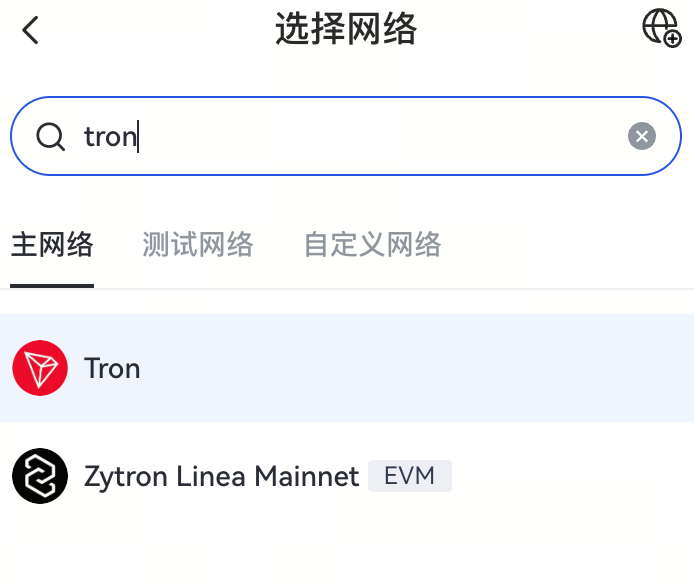
Step 3: Select the Tron network. After setup, search for and select the “Tron (TRX)” network from the main interface.
Step 4: Obtain your address and deposit funds. Tap “Receive,” select USDT, and your deposit address will be displayed.
Step 5: Transferring. When sending USDT, make sure your wallet contains a small amount of TRX to cover transaction fees. Enter the recipient’s address → amount → confirm the transaction.
The entire setup process can be completed in a few minutes, making it suitable for beginners.
Risks and Precautions When Using a USDT TRC20 Wallet
While TRC20 wallets are user-friendly, it’s crucial to pay attention to security:
- Never share your mnemonic phrase; it’s the sole “key” to your wallet.
- Verify the correct network: Always select the TRC20 network for transfers, or your funds could be lost.
- Beware of fake wallets and phishing sites. Only download from official sources.
- Maintain a small TRX reserve: This ensures you can complete transactions at any time.
- Monitor updates to fee policies. Some companies (such as BitHide) are rolling out cost-saving initiatives. These may soon become available to individual users.
Following these guidelines will help keep your USDT TRC20 wallet secure and efficient.
Related Articles
2026 Stablecoin Classification Deep Dive: From Fiat-Collateralized to Algorithmic Stablecoins, Market Landscape and Future Trends

What Are Fractional NFTs? Understanding the Mechanics of NFT Fractionalization and Its Real-World Use Cases
Top Telegram Games to Watch in 2026: The New Web3 Gaming Frontier and Investment Strategies

The Next 100x Coin? Low-Cap Crypto Gem Analysis

What Is Jupiter? A Complete Guide to Solana’s Leading Decentralized Exchange Aggregator
